Collect, analyse and report your data from one platform
🛠️ Forms
📋 Surveys
📈 Indicator Monitoring
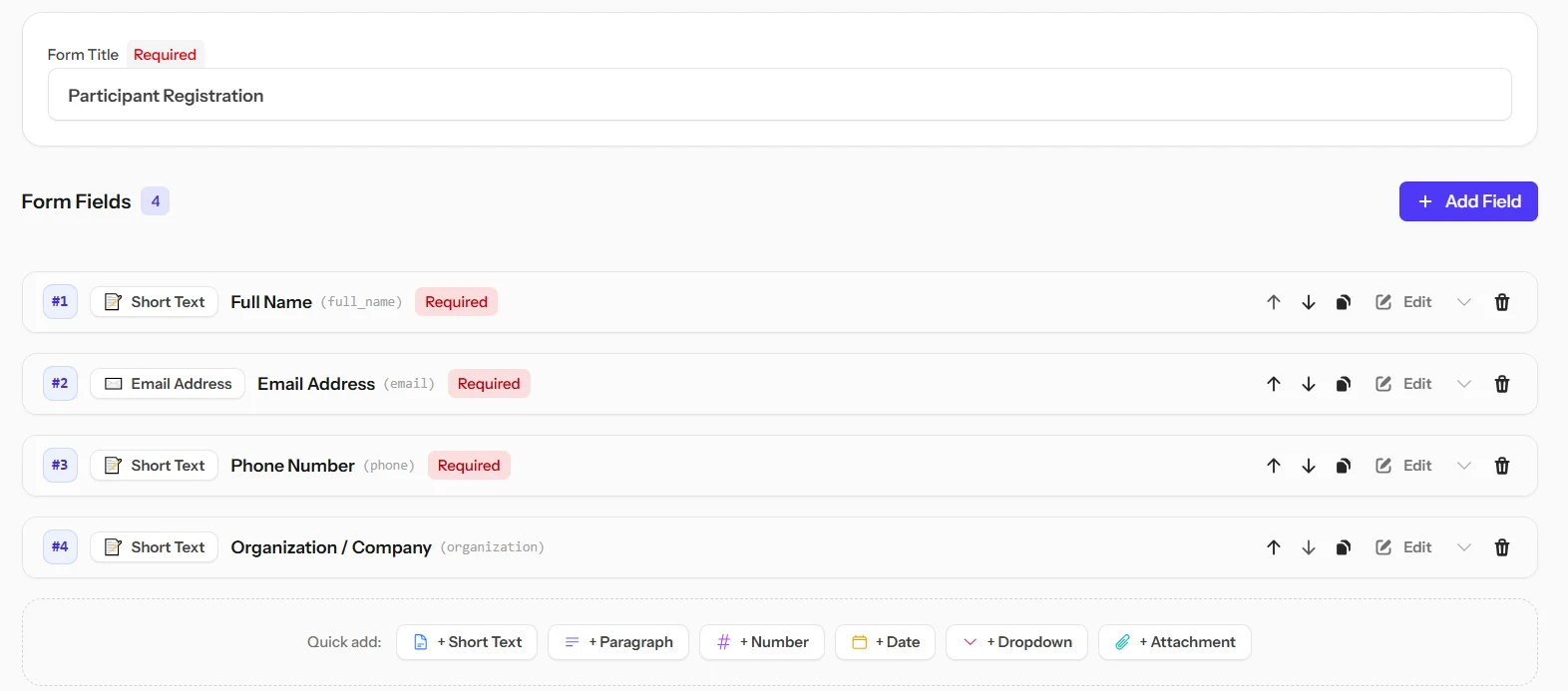
Build field forms with zero code, launch surveys for administrative or academic research, and — as a fully independent tool — track your indicators and generate donor-ready reports in one click.
Watch a form go out, collect responses and turn them into statistics in 20 seconds.
⚡ Professional Toolkit for Fast & Accurate Delivery
Three Integrated Tools Empowering Your Success at Every Project Stage
Whether you are a MEAL officer, project coordinator, or field researcher; leave messy spreadsheets behind and handle everything from field intake to audit-ready reports in one seamless workflow.
Build your survey once in Arabic. Respondents read and answer it in the language they choose - while your data stays in one language, ready to analyse.
A respondent who picks "Good" in English has "جيد" recorded - the answer is always stored in the language the survey was written in. Your reports never have to reconcile the same answer written five ways.
✅
Nothing published before you read it
Machine translation is a draft, not a published question. Every language waits for your approval before any respondent sees it - because a mistranslated question changes what you are measuring.
🔤
The respondent chooses
You set a default language, and respondents can switch to any other approved one from the form itself. The page direction flips with it, so Arabic reads right-to-left and the rest left-to-right.
Available languages
More can be added on request.
العربية
English
Français
Türkçe
Русский
📶 Offline Field Collection
Keep collecting, even where there is no signal
Pulseform Collect turns any survey into a field-ready app your team can use for days without a connection. Every response is saved on the device the moment it is entered, and synced automatically the next time you are back online - nothing is lost to a dead zone.
Your MEAL officer issues each field collector a single code for one survey. No email, no password, no seat to add - the collector opens the link, enters the code once, and starts working.
🗂️
Draft, review, then send - on your terms
Every response is saved locally the moment it is filled in. Mark it ready when you are confident in it, and send the whole batch the next time you have signal - exactly like the field tools your team already knows.
📲
Installs from a link, not an app store
No Play Store listing, no APK to sideload, no update to wait for. The tool installs straight from the browser onto a phone, tablet, or laptop, and looks and behaves the same on all three.
Every response, one clear status
From the moment it is typed in the field to the moment it lands in your dashboard.
Draft
→
Ready to send
→
Sent
|
Under review
🗳️ Verified Participation
One link per person. One answer. No trace of who said what.
Most form tools give you two options: fully anonymous (responses repeat, no way to know who answered) or fully identified (honesty drops). Verified Participation gives you both: the platform knows who answered — so the roll is complete and no one votes twice — but it cannot say what any individual answered.
Only the people on the list can answer. Anyone outside it — including someone who guesses the public link — is turned away.
🔗
One personal link, used once
Each person receives a unique link that opens the form for them and no one else. The link stops working the moment they submit — no second vote, no shared links.
🔒
Identity separated from the answer
The roll records that a person answered. The submission records what they answered. The two tables share no key — by design, not by policy.
🔐
Results sealed until closing time
Nobody can see the tally while responses are still coming in. Results open the moment the form closes — so an early count cannot sway those who have not yet answered.
🧾
Tamper-proof records and audit trail
Once responses arrive, records are locked: no deletions, no imports, no rewording of options that would change what the votes mean. Every team action is recorded in an append-only log.
📖
Useful wherever honesty and accountability must coexist
A form is sent to a list of participants with one personal link each; each person answers once, and the result is shown without linking anyone to their answer.
Clean data from the first keystroke
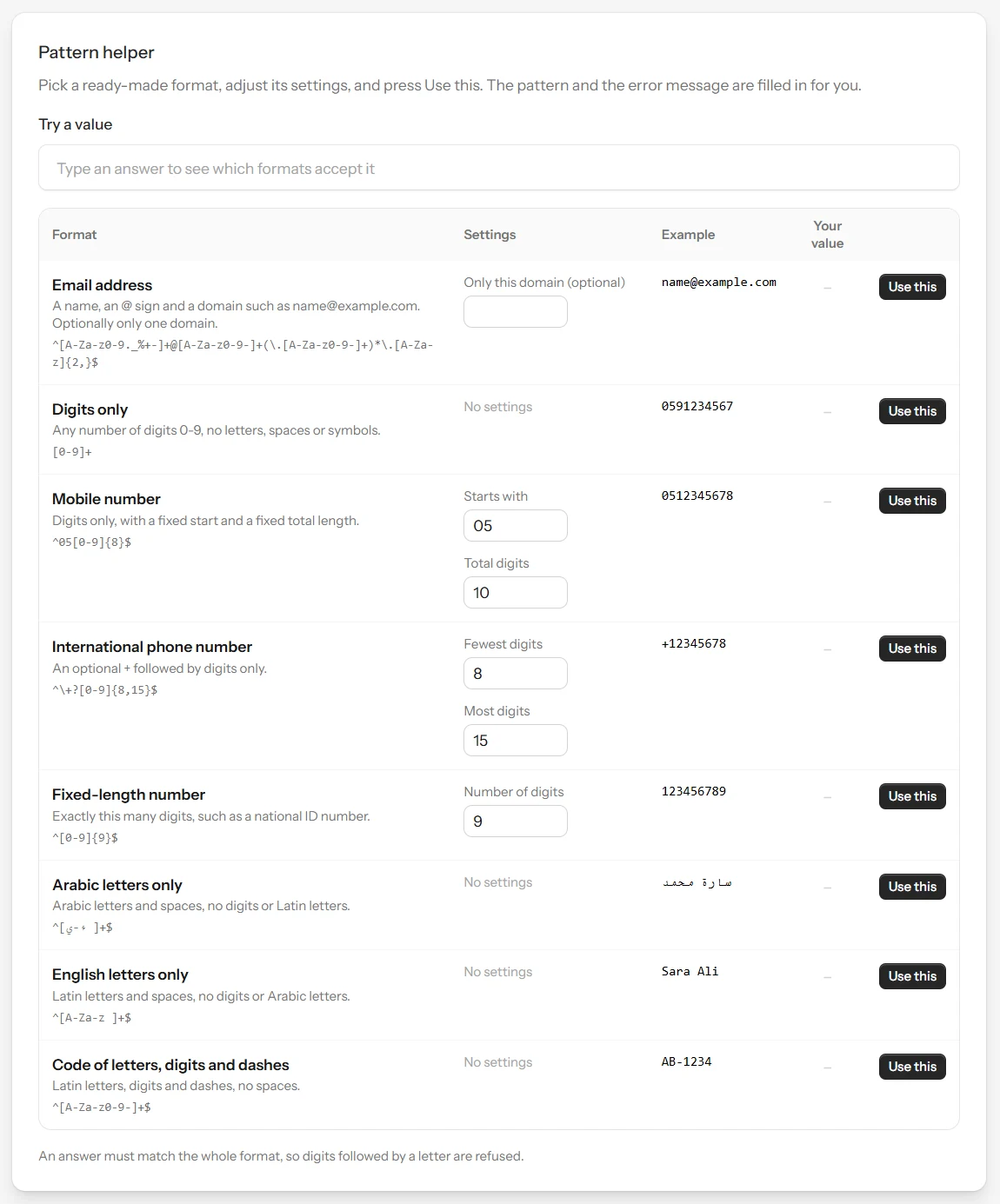
Decide what shape an answer must have, and one that does not fit is refused with your own message instead of landing in your records.
1No regex to writePick a format such as a mobile number, an email or an Arabic name in the Pattern helper. The pattern and the error message are filled in for you.
2Checked on import tooThe same patterns apply when you import a CSV file with validation turned on, not only on the public link.
3No field answer is lostAn answer from your field team that does not fit is kept and marked, so you can review it instead of losing it.
Everything you need to know about security, hosting, data sovereignty, and trials.
Yes. Forms, Surveys, and Monitoring each activate with their own independent subscription. Subscribe to only the service you need, or combine more than one as your work requires — there is no bundled plan.
Yes, you can add team members under your organization account and set each member's role (administrator or team member) according to their responsibilities.
Yes, full export capabilities are built in. You can export responses and analytics to Excel, CSV, and formatted PDF reports with one click.
Yes. Every form and survey is fully responsive and touch-optimized across phones, tablets, and desktops - and for field surveys specifically, Pulseform Collect lets your team keep working with no signal at all, saving responses on the device and syncing automatically once they are back online.
No installation is required to use Pulseform day-to-day - it runs entirely in your browser. Field collectors have the option to install Pulseform Collect with one tap for faster, offline access, but this is entirely optional and never required to use the platform.
Your account becomes read-only for 60 days: you can still view and export everything, but nothing new is collected. This applies when the trial of your last service ends, when a paid subscription is not renewed, and immediately when you close your account yourself. We remind you 14, 7 and 1 days before the end. If you have not subscribed by then, the account is suspended and all of its data, files and remaining AI credit are permanently deleted.
Yes. Sign in with the same email and reactivate the same account. It starts empty, because the deleted data cannot be recovered, and without a new free trial, which is given once per account. Subscribe to any service to start working again.
Services bought with a one-time payment last for years, but an account that nobody signs in to and that receives no responses for 24 months is treated as abandoned. We email you 30, 14 and 7 days before, and signing in once keeps it. If nobody does, it becomes read-only for 60 days — signing in during that time reopens it with nothing to buy — and is then permanently deleted.
Yes. Any paid service gives your account 500 MB of free attachment storage, shared across all your forms and services. Need more room? Rent extra storage by the gigabyte, any time, from your subscription page.
Yes. Your team uses the Collect app on a phone or tablet. Answers are saved on the device and sent automatically when a connection returns. Collectors need only an access code, with no account to manage.
Yes. An Academic & Postgraduate Research survey computes Cronbach's alpha, APA 7 descriptive tables, factor analysis, correlation, regression and group tests automatically, and exports your data with a codebook for SPSS.
Pulseform goes beyond collecting answers: it analyses them (reliability, group comparisons, indicator tracking), supports field teams working offline, and offers verified participation where identity is kept separate from the answer.
Yes. With verified participation each person gets one personal link that works once, identity is kept separate from the answer, and results stay sealed until the closing time you set.
Ready to elevate your data collection & monitoring?
Join hundreds of organizations and companies using Pulseform to build smart forms, collect surveys, and monitor mission-critical indicators.